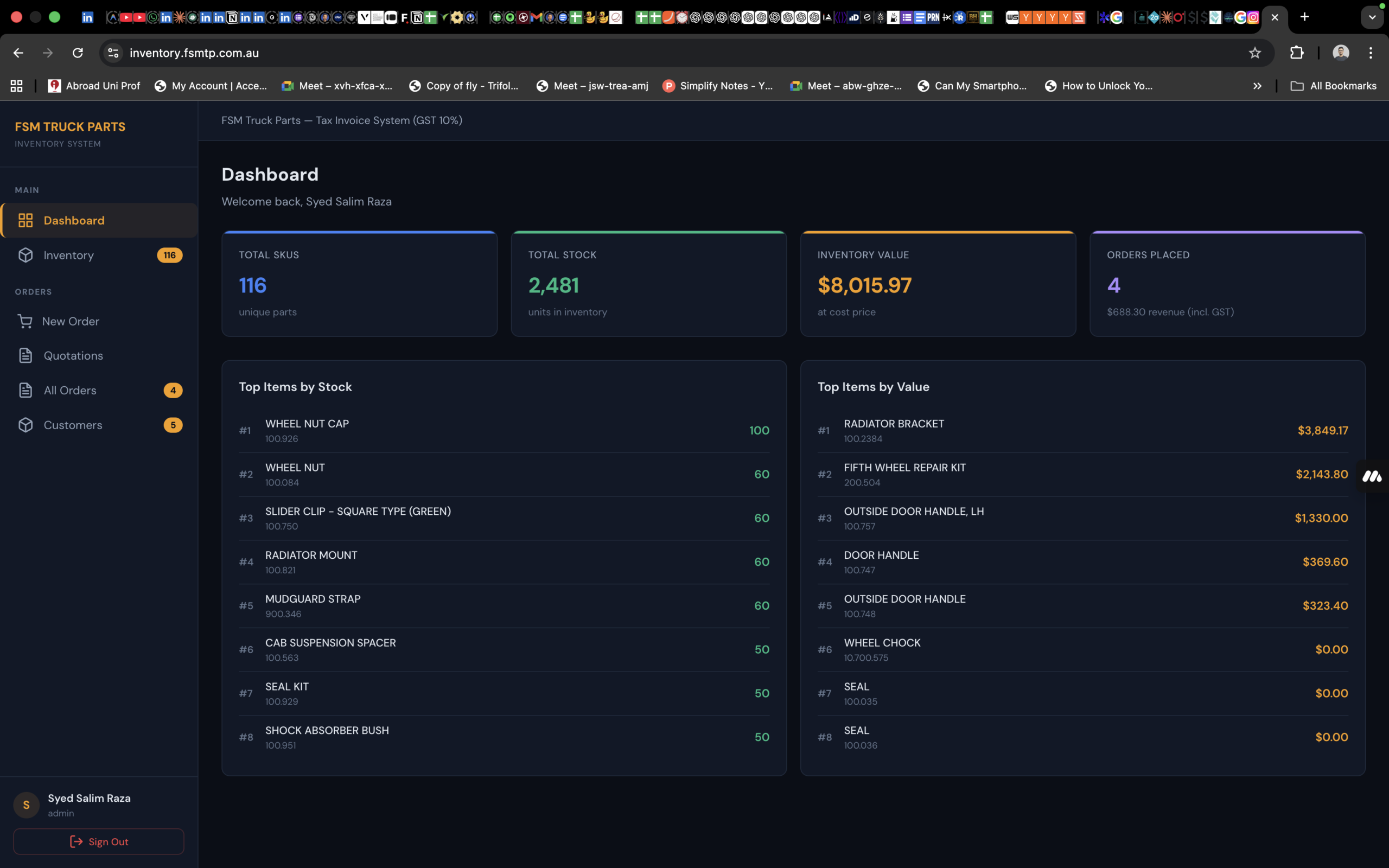
When FSM Truck Parts Pty Ltd — an Australian truck parts distributor based in Truganina, Victoria — came to us, they were running their business on spreadsheets. Stock counts lived in Excel. Orders were tracked manually. Invoices were created one at a time in Word. And every time someone needed to check whether a part was in stock, it meant walking to the warehouse or making a phone call.
They didn’t need a generic SaaS tool with a hundred features they’d never touch. They needed a system built around how their business actually works — from the moment a customer asks for a quote to the moment the parts get loaded onto a truck.
Here’s how we built it.
The Problem
FSM Truck Parts carries hundreds of individual parts — each with its own item code, OEM reference number, warehouse location, and pricing. Orders flow through a specific lifecycle: a customer requests a quote, the quote gets approved (or doesn’t), the order is confirmed, parts are picked from the warehouse, and the shipment goes out. Along the way, invoices need to be generated, GST needs to be calculated correctly, stock levels need to be adjusted, and customers need to receive professional documents by email.
Before our system, every one of those steps was manual. Stock levels were often out of date. Invoices had formatting inconsistencies. There was no single place to see all open orders, no way to quickly pull up a customer’s history, and no easy way to generate the warehouse pick slips that the floor team needed to locate and pack parts.
The business needed a single system that handled all of it — inventory, quoting, invoicing, stock management, customer records, email dispatch, and reporting. And it needed to be fast, because the team was often creating quotes while customers waited on the phone.
What We Built
We delivered a full-stack web application that manages the complete order lifecycle with real-time inventory tracking. The system runs as an internal tool at inventory.fsmtp.com.au, accessible from any device with a browser — desktops in the office, tablets in the warehouse, or phones on the go.
The Tech Behind It
We chose a stack optimised for speed of development and performance. The frontend is a React single-page application built with Vite, giving the team instant page transitions and real-time search without any loading screens. The backend runs on Node.js with Express, connected to a MySQL database that handles all inventory, order, and customer data. Authentication uses JWT tokens, and emails are dispatched through Nodemailer over SMTP.
No heavy UI frameworks, no unnecessary dependencies. The result is an application that loads fast, runs smooth, and does exactly what the business needs — nothing more, nothing less.
Inventory Management
The inventory module gives FSM a complete view of every part in their warehouse. Each item record includes the part number, OEM reference, description, warehouse shelf location, unit price, and current stock quantity.
The search is instant — the team can type a part number, description, or OEM reference and see matching results as they type. This matters when a customer calls and asks “do you have the brake pads for a Hino 500 series?” The team can search, find the part, check stock levels, and see the price in under two seconds.
Stock adjustments are tracked with full audit trails. Every time someone adds or removes stock — whether from receiving a new shipment, correcting a count, or processing a return — the system records what changed, by how much, who did it, and why. This creates a complete history of stock movements that can be reviewed at any time.
The inventory overview also highlights low stock alerts for any item with five or fewer units remaining, so the team can reorder before they run out.
The Quoting and Invoicing Workflow
This is where the system really earns its keep. The order form is designed around the way FSM actually processes a sale.
When creating a new quote, the team starts by typing the customer’s company name. If the customer has ordered before, their details auto-fill — contact person, address, email, phone. No retyping. For new customers, the details are entered once and automatically saved to the customer database for future orders.
Adding line items works the same way. Type a part number or description, and matching inventory items appear in a dropdown. Select the item, set the quantity, optionally apply a discount, and the line is added to the order. The cart summary updates in real time showing the subtotal, GST (calculated at 10% on the subtotal only — freight is excluded from GST, which is correct per Australian tax rules), freight charge, and total.
From here, the team has two options. They can save it as a quotation (assigned a QUO number), which holds everything without touching stock levels — useful when a customer is still deciding. Or they can generate an invoice directly (assigned an INV number), which confirms the order and immediately deducts the quantities from inventory.
When a quotation is later approved, the system assigns an invoice number and deducts stock at that point. If a quotation is cancelled, nothing changes. If an approved order is cancelled, the stock is automatically restored. The system handles all of these transitions correctly, including edge cases like editing an order after approval — it restores the old quantities first, then deducts the new ones.
Document Generation
Every invoice and quotation can be printed as a professionally formatted document directly from the browser. The tax invoices include the company header, ABN, customer details, a full line items table, GST breakdown, bank details for payment, and terms and conditions. Quotations follow the same format with appropriate labelling.
The system also generates warehouse pick slips — internal documents that show the parts picker exactly which items to pull, from which shelf locations, with checkboxes to tick off as they go. Pick slips include signature lines for the picker and the person who checks the order before dispatch.
For accounting and reporting, there’s a bulk export feature. Select a date range, and the system generates a summary of all delivered invoices with totals — or a multi-page pick slip document covering all active orders in that period.
All of this happens in the browser with no external PDF libraries. The documents are rendered as formatted HTML and sent to the print dialog, where they can be printed or saved as PDF. It’s simple, it’s fast, and it produces clean, professional output every time.
Email Dispatch
Invoices and quotations can be emailed directly to customers from within the system. The email modal pre-fills the customer’s address (editable if needed) and sends a fully formatted HTML email that mirrors the printed document — company logo, customer details, line items, totals, bank details, and payment terms all included. The customer receives a professional document without anyone having to open Outlook, attach a file, or format anything manually.
Customer Database
The customer module builds itself automatically. Every time an order is placed, the customer’s details are saved or updated. Over time, this creates a complete directory of every company FSM has done business with, searchable by name, email, or ABN. The autocomplete feature in the order form means that repeat customers can be processed in seconds.
Dashboard and Reporting
The dashboard gives management a real-time overview of the business: total revenue, GST collected, items sold, order count, the five most recent orders with status badges, and low stock alerts. It’s the first thing the team sees when they log in — a snapshot of how the business is tracking without having to dig through reports.
Security
For a system handling business financial data, security was non-negotiable. All API routes are protected by JWT authentication. Passwords are hashed with bcrypt. API endpoints are rate-limited to prevent brute force attempts on the login page. The database uses parameterised queries throughout to prevent SQL injection. Stock operations use database-level row locking and transactions to prevent race conditions when multiple users are processing orders simultaneously. And the server won’t even start without the required security credentials configured.
The Impact
The system replaced a workflow that previously involved Excel spreadsheets, Word document templates, manual stock counts, and email clients. Now, everything happens in one place.
Quoting time dropped significantly. What used to take several minutes of looking up parts, checking stock, typing customer details, and formatting a document now happens in under a minute. The autocomplete features for both customers and inventory items mean the team spends their time talking to customers, not typing.
Stock accuracy improved because every movement is tracked automatically. When parts are sold, the inventory updates instantly. When stock is received or adjusted, there’s a recorded reason. The low stock alerts catch potential shortages before they become problems.
Professional document output became consistent. Every invoice and quotation looks the same — clean, branded, and accurate. The email dispatch means customers receive their documents within seconds of the quote being created, which matters in a competitive market where the fastest response often wins the sale.
And because the system is web-based, it’s accessible from anywhere. The office team uses it on desktops. The warehouse team can check stock on a tablet. And management can review the dashboard from their phone.
Technical Decisions Worth Noting
A few of our architectural choices are worth highlighting for anyone considering a similar project:
Single-page application architecture. The entire frontend runs as one React component. This sounds extreme, but for an internal tool with a well-defined user base, it means zero page reloads, instant navigation, and a desktop-app feel in the browser. Every tab switch, every search, every modal — all instant.
No external PDF libraries. Instead of adding heavy dependencies for PDF generation, we render documents as HTML and use the browser’s native print functionality. The documents are styled with precise CSS for print media, producing professional results without any third-party cost or complexity.
Australian tax compliance baked in. GST is calculated at 10% on the subtotal only, with freight excluded from the tax calculation. This logic is enforced consistently across the backend calculations, frontend display, printed documents, and email templates — there’s no way for the numbers to get out of sync.
Offline fallback mode. If the backend server is unreachable, users can log in with default credentials and see sample data. This means the team can at least reference the interface even if there’s a server issue — a small touch that avoids complete work stoppage.
Building Custom Business Software
This project is a good example of what happens when you build software around a real workflow instead of forcing a business to adapt to generic tools. FSM Truck Parts didn’t need a massive ERP platform. They didn’t need inventory management designed for a warehouse with 50,000 SKUs. They needed something that fits their specific operation — their parts, their customers, their quoting process, their invoicing rules.
That’s the value of custom software. It does exactly what you need, the way you need it done, without the overhead of features you’ll never use or the frustration of workarounds for features that almost-but-don’t-quite work.
If your business is running on spreadsheets, juggling multiple disconnected tools, or bending generic software to fit your workflow, a purpose-built system might be the most productive investment you make.
Want to discuss a custom business application for your company? Book a free consultation with Wilnet Solutions →
Wilnet Solutions builds custom web applications, mobile apps, and enterprise software for Australian businesses. Explore our IT solutions → | See our portfolio →